
Time
is
money—especially
for
law
firms.
Whether
you’re
a
solo
practitioner
or
part
of
a
larger
firm,
keeping
detailed
records
of
how
you
spend
your
day
ensures
that
you’re
compensated
fairly
and
helps
you
identify
areas
for
improved
efficiency
in
law
firm
accounting.
Yet,
many
attorneys
still
rely
on
outdated
or
inconsistent
methods
for
tracking
their
time,
leading
to
missed
billable
hours
and
administrative
headaches.
That’s
where
an
attorney
time-tracking
template
comes
in.
Using
a
structured
timesheet
is
an
easy
and
effective
way
to
keep
a
close
eye
on
your
daily
tasks—ensuring
that
nothing
falls
through
the
cracks.
These
templates
are
also
designed
specifically
for
legal
professionals,
with
fields
for
case
numbers,
client
names,
and
detailed
work
descriptions.
Check
out
our
free
attorney
time
tracking
templates
and
explore
tips
to
streamline
your
law
firm’s
time
management.
Daily
Attorney
Time
Tracking
Template
Using
a
daily
attorney
time
tracking
template
ensures
you
capture
billable
hours
in
real
time.
While
weekly
or
monthly
tracking
can
seem
convenient,
daily
tracking
offers
more
accuracy
and
reduces
the
likelihood
of
missed
billable
opportunities.
Here’s
how
you
can
use
our
daily
time
tracking
sheet:
-
Enter
basic
details
like
the
date,
attorney’s
name,
and
law
firm
name
at
the
top
of
the
“Daily
Template”
tab. -
Manually
fill
in
details
for
each
task,
including:-
Case
number -
Client
name -
Task
code -
Task
description -
Rate
-
Start
time -
End
time -
Total
time
-
-
And
voila!
The
spreadsheet
will
automatically
calculate
the
line
total
for
that
task.
Avoid
editing
cells
containing
formulas
unless
you
make
intentional
changes—as
this
could
disrupt
the
calculations.
If
you
need
to
adjust
the
billing
increments,
update
the
formula
accordingly
or
calculate
manually.
Note:
You
must
be
logged
in
to
a
Google
Account
to
open
and
make
a
copy
of
the
Google
Sheets
templates.
Weekly
Attorney
Time
Tracking
Template
A
weekly
attorney
time-tracking
template
gives
you
a
broader
view
of
your
billable
hours
and
allows
for
more
flexibility
when
logging
tasks
over
several
days.
This
approach
is
particularly
useful
when
managing
multiple
cases
or
tasks
that
extend
throughout
the
week.
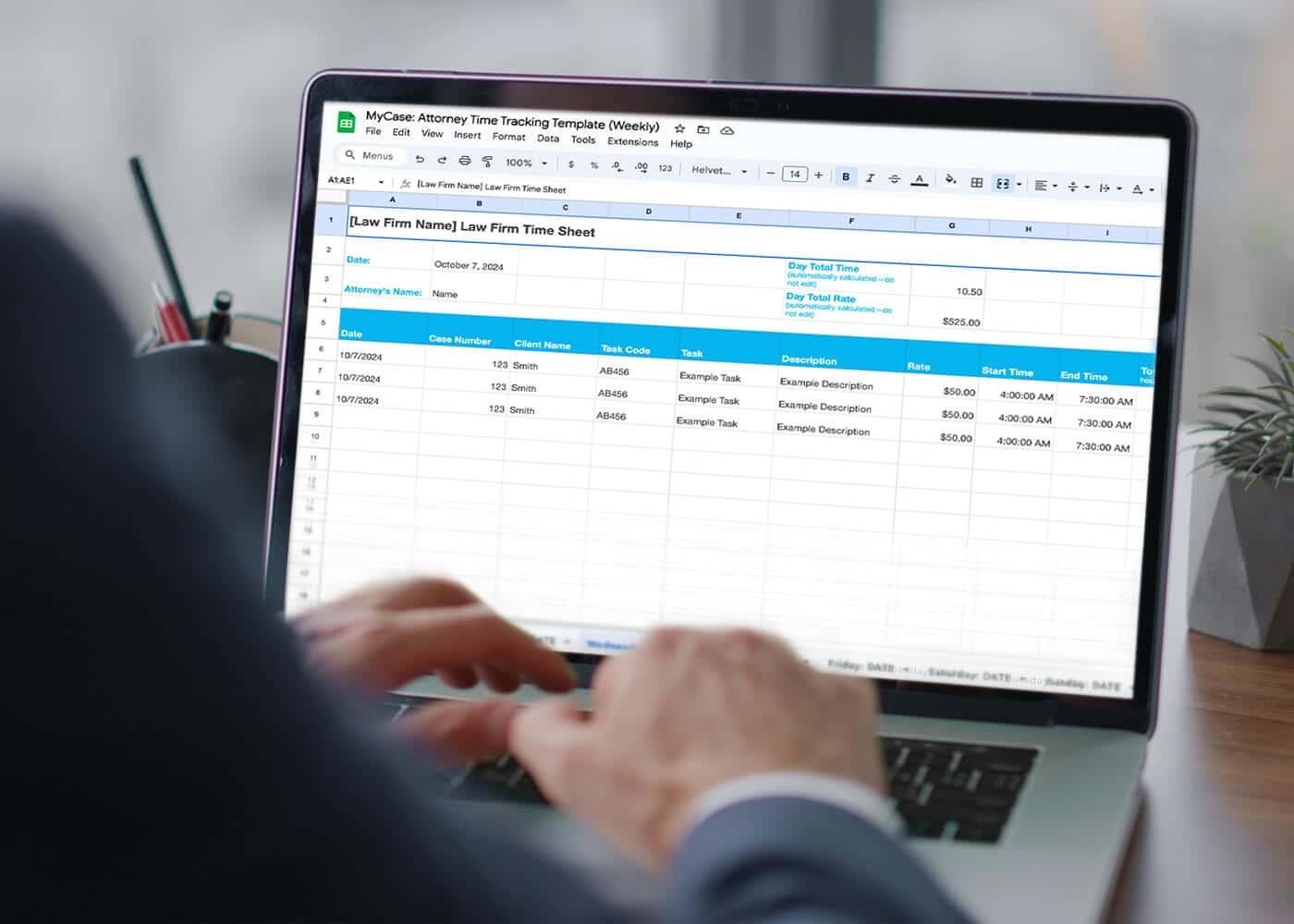
To
use
the
weekly
attorney
time
tracking
template:
-
Simply
rename
each
tab
to
match
the
day
you’re
tracking,
like
“Mon:
10/7/2024.” -
Enter
the
date,
attorney’s
name,
and
law
firm
name
at
the
top. -
Manually
add
details
for
each
task,
including:-
Case
number -
Client
name -
Task
code
(if
applicable) -
Task
description -
Rate
-
Start
time -
End
time -
Total
time.
-
-
The
total
rates
for
each
day
and
the
week
will
automatically
be
calculated
for
you.
Just
be
sure
not
to
move
any
sections
or
edit
the
formula
cells,
as
this
will
break
the
calculations.
If
you
prefer
different
billing
increments,
tweak
the
formulas
or
calculate
manually.
Note:
You
must
be
logged
in
to
a
Google
Account
to
open
and
make
a
copy
of
the
Google
Sheets
template.
Monthly
Timesheet
Template
A
monthly
timesheet
template
is
a
great
option
if
you
manage
long-term
cases
or
projects,
providing
a
high-level
overview
of
a
client’s
billable
hours
over
an
extended
period.
It’s
especially
useful
for
reviewing
overall
productivity
and
ensuring
you
don’t
miss
anything
before
submitting
invoices.
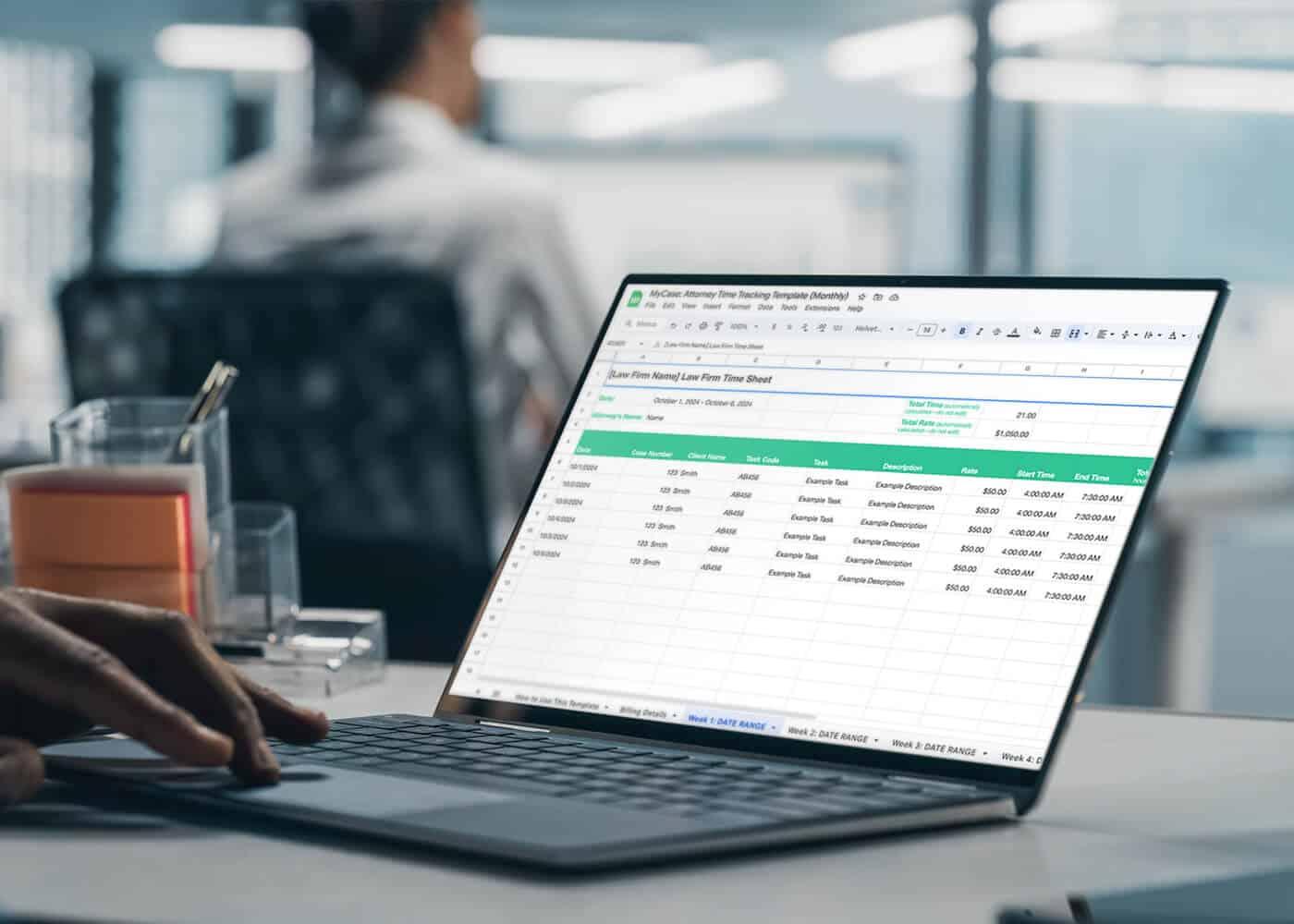
To
use
the
monthly
timesheet
template,
follow
these
steps:
-
Rename
each
tab
to
reflect
the
week
you’re
tracking,
such
as
“Week
1:
10/7/2024-10/13/2024.” -
Enter
the
date,
attorney’s
name,
and
law
firm
name
at
the
top
of
the
sheet. -
Manually
fill
in
details
for
each
task,
including:-
Case
number -
Client
name -
Task
code
(if
applicable) -
Task
description -
Rate
-
Start
time -
End
time -
Total
time
-
-
Review
the
total
rates—these
will
automatically
calculate
for
each
week
and
the
entire
month.
To
prevent
calculations
from
breaking,
avoid
moving
sections
or
editing
formula
cells.
If
necessary,
adjust
the
billing
increment
formulas
or
calculate
time
manually.
Note:
You
must
be
logged
in
to
a
Google
Account
to
open
and
make
a
copy
of
the
Google
Sheets
template.
What
To
Include
in
an
Attorney
Time
Tracking
Template
An
effective
attorney
time-tracking
template
ensures
accurate
legal
billing
by
capturing
all
essential
details,
so
nothing
is
overlooked
when
tracking
time
and
billing
clients.
Here
are
the
standard
fields
you
should
include:
-
Employee
name
and
supervisor
(if
applicable):
Identify
the
attorney
and
their
overseeing
supervisor
for
accountability. -
Case
information:
Include
the
case
number
and
details
for
easy
reference. -
Client
information:
Add
client
names
to
track
who
the
work
is
for. -
Date
range:
Define
the
period
you’re
tracking. -
Date
of
task:
Record
the
specific
date
each
task
was
completed. -
Task
name:
List
the
task
title
for
clarity. -
Task
activity:
Provide
a
brief
description
of
the
work
done. -
Applicable
billing/client
codes:
Include
any
codes
required
for
internal
tracking
or
client
billing. -
Rate:
Add
your
hourly
rate
for
the
task. -
Time
tracked:
Insert
the
start
and
end
time
or
the
total
time
spent
on
the
task. -
Signature
areas
(if
applicable):
Provide
this
information
if
you
need
it
for
employee
and
supervisor
approval. -
Total
hours
logged
for
the
period:
Include
the
sum
of
all
time
tracked
for
that
time
frame. -
Total
cost:
Don’t
forget
to
add
the
total
billable
amount
based
on
hours
worked
and
rate. -
Distinction
between
billable
and
non-billable
hours:
Separate
out
billable
hours
from
non-billable
work
to
ensure
accurate
invoicing.
Overall,
incorporating
these
elements
enhances
billing
accuracy
by
providing
clear,
detailed
records
that
support
timely
invoicing.
How
To
Track
Billable
Hours
Tracking
billable
hours
efficiently
can
help
your
law
firm
maximize
revenue
while
maintaining
client
transparency.
Failing
to
track
time
accurately
can
lead
to
underbilling,
disputes,
or
even
missed
revenue
opportunities—ultimately
affecting
client
trust
and
your
firm’s
profitability.
One
of
the
best
ways
to
ensure
time
tracking
accuracy
is
by
using
an
attorney
billable
hours
chart.
This
chart
breaks
down
time
increments—typically
in
one-tenth
of
an
hour—so
you
can
record
time
quickly
and
accurately
for
each
task
you
complete.
Adopting
this
method
also
simplifies
the
overall
tracking
process
and
avoids
the
risk
of
underbilling.
For
even
greater
efficiency,
consider
integrating
time
management
software
for
law
firms,
which
automatically
tracks
and
logs
hours
as
you
work.
And
when
you
pair
it
with
a
legal
invoice
template,
this
system
can
streamline
your
entire
billing
process,
from
recording
hours
to
invoicing
clients.
As
a
result,
you
can
stay
organized
and
ensure
all
billable
hours
are
accounted
for
without
spending
extra
time
on
manual
tracking.
Benefits
and
Drawbacks
of
Attorney
Timesheet
Templates
While
attorney
timesheet
templates
are
widely
used
for
tracking
time,
it’s
important
to
weigh
the
pros
and
cons
to
understand
how
these
systems
can
impact
your
firm’s
efficiency
and
accuracy
in
managing
billable
hours.The
benefits
of
attorney
time
tracking
templates
can
include:
-
Using
a
system
that
starts
at
no
cost—with
minimal
setup
and
training
required. -
The
ability
to
standardize
time
data
submissions
across
the
law
firm,
improving
consistency. -
Easily
automating
calculations
in
spreadsheets
for
time
and
billing
totals. -
Improvement
to
your
utilization
rate
based
on
the
tracked
time. -
While
timesheet
templates
can
be
a
convenient
solution,
they
have
several
drawbacks
that
can
hinder
your
firm’s
productivity
and
accuracy.
The
common
challenges
of
using
templates
for
time
tracking
can
include:
-
Versioning
issues
that
are
caused
by
multiple
people
using
different
file
copies. -
A
high
likelihood
of
human
error
during
manual
data
entry
and
analysis,
which
can
lead
to
revenue
leakage
or
ethical
issues. -
Accidentally
changing
formulas
that
disrupts
automatic
calculations. -
Lack
of
mobile-friendliness,
making
it
inconvenient
to
update
on
the
go. -
Difficult
integration
with
other
systems
and
software.
Also,
it’s
tough
to
remember
everything
you’ve
done—especially
when
separating
billable
vs.
non-billable
time—and
it
only
gets
harder
the
longer
you
wait
to
update
the
sheets.
Tips
for
Maintaining
Accurate
Time
Tracking
Maintaining
accurate
time
tracking
is
essential
to
avoid
revenue
leakage
and
ensure
clients
are
billed
correctly.
Implementing
efficient
tracking
methods
can
streamline
your
workflow
and
improve
overall
productivity.
Here
are
some
quick
tips
to
help
you
stay
on
track:
-
Consider
online
billing
for
easier
access
and
automation,
which
can
help
improve
tracking
accuracy
and
efficiency. -
Track
in
real
time
to
avoid
forgetting
billable
tasks. -
Include
detailed
descriptions
for
each
task
to
provide
clarity
and
justification
for
billing. -
Make
time
to
double-check
entries
before
submitting
them
to
catch
errors. -
Use
standardized
tracking
increments
according
to
a
billable
hours
chart. -
Enforce
standard
billing
guidelines
across
the
law
firm
to
maintain
consistency. -
Use
passive
time-tracking
software
to
capture
time
without
manual
input.
According
to
our
2024
Legal
Industry
Report,
65%
of
law
firms
use
online
time-tracking
software,
with
47%
of
those
firms
capturing
an
additional
1-5
hours
weekly.
Furthermore,
50%
of
firms
that
use
passive
time-tracking
software
also
capture
1-5
extra
hours
each
week.
Learn
how
to
save
time
on
routine
tasks,
simplify
the
invoicing
process,
and
standardize
the
steps
for
every
client.

Automate
Time
Tracking
and
Invoice
Generation
With
MyCase
Tracking
time
manually
can
be
cumbersome
and
prone
to
errors.
From
ensuring
accurate
time
logs
to
maintaining
consistency
across
your
firm,
there’s
a
lot
to
manage.
The
good
news?
You
can
streamline
this
entire
process
by
automating
time
tracking
and
invoice
generation
with
MyCase.
Our
time-tracking
software
takes
the
hassle
out
of
manual
entries
and
calculations—letting
you
focus
more
on
your
legal
work
and
less
on
administrative
tasks.
If
you’re
to
boost
your
firm’s
efficiency
and
capture
every
billable
hour,
sign
up
for
a
free
trial
of
MyCase
today
and
see
how
easy
it
can
be
to
manage
time
tracking
and
invoicing.