
simple
design
and
reliable
performance
takes
the
stress
out
of
redlining
and
summarising
changes.
It’s
closing
in
on
midnight,
and
instead
of
watching
that
movie
you
planned,
you’re
toggling
between
three
windows
on
your
laptop.
Jittery
after
your
third
cup
of
coffee,
you’re
trying
to
reconcile
the
“final-final-v7-clean.docx”
version
of
a
1,000-page
contract
a
partner
sent
before
dinner.
The
deadline
to
file
is
tomorrow.
The
redlines
are
chaotic,
the
PDF
formatting
is
jumping
all
over
the
place,
and
the
software
keeps
crashing.
Hanging
over
it
all
is
the
dread
that
a
single
missed
change
will
blow
the
deal.
That’s
exactly
the
situation
the
fastest-growing
document
comparison
tool
Draftable
was
built
to
resolve.
“Every
lawyer
has
lived
that
pain,”
said
Caspar
Roxburgh,
product
lead
at
Draftable.
“Our
goal
was
to
make
sure
they
never
have
to
again.”
Unlike
other
legal
tech
that
tries
to
do
everything,
Draftable
focuses
on
one
thing:
making
document
comparison
seamless.
The
software
doesn’t
need
hours
of
training,
and
it
doesn’t
overwhelm
you
with
features
you
don’t
need.
And
with
its
newest
upgrade,
redlining
directly
in
email,
it
has
become
even
more
useful.
“We’ve
been
demoing
this
new
feature
at
conferences
and
firms
are
saying,
‘I
want
everyone
in
my
firm
to
have
this.
This
is
something
I
need,’”
Roxburgh
said.
He
noted
these
features
also
come
at
a
more
affordable
price
than
any
competing
software.
More
than
900
law
firms
globally
have
already
switched
to
Draftable,
including
leading
firms
like
Allens,
Brodies
and
Mills
&
Reeve.
So
read
ahead
for
a
quick
primer.
Getting
Started
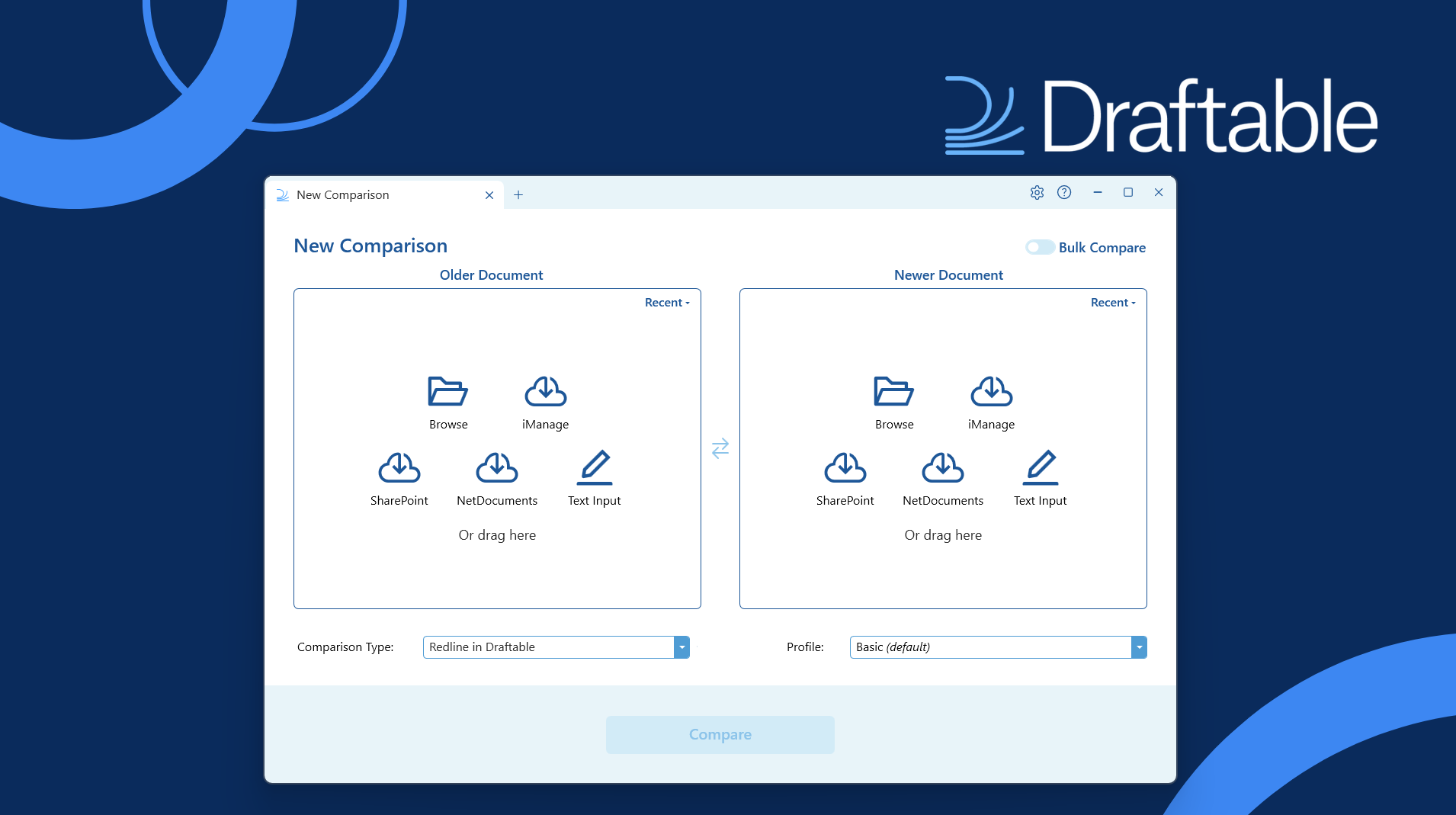
The
simple
interface
of
Draftable
is
designed
to
mimic
familiar
software
to
clearly
show
lawyers
what
changed
between
two
documents.
Users
upload
two
versions
of
a
file
and,
with
a
single
click,
the
software
highlights
the
differences.
Courtesy
of
Draftable.
Draftable
offers
more
than
25
ways
to
upload
documents,
letting
lawyers
work
exactly
how
they
like.
You
can
drag
and
drop
files,
browse
from
your
desktop,
right-click
or
pull
them
straight
from
iManage,
NetDocuments,
SharePoint
or
other
web-based
software.
There’s
also
quick
access
to
recently
compared
files
and
even
the
option
to
paste
text.
The
software
integrates
with
Word,
Excel,
Outlook
and
other
everyday
tools,
“almost
pedantic”
in
the
number
of
paths
it
offers,
Roxburgh
said.
But
that’s
the
point.
“It’s
part
and
parcel
of
trying
to
build
something
that
time-poor
lawyers
need
to
just
work,
and
everyone’s
got
their
own
way
of
doing
things,”
he
said.
No
Regrets
Design
Once
the
software
runs
the
comparison,
lawyers
can
review
the
changes
in
several
ways,
depending
on
their
preference.
A
drop
down
menu
offers
the
choice
to
redline
in
Draftable
directly,
using
track
changes
in
Word,
as
a
side
by
side
comparison
and
in
a
departures
table.
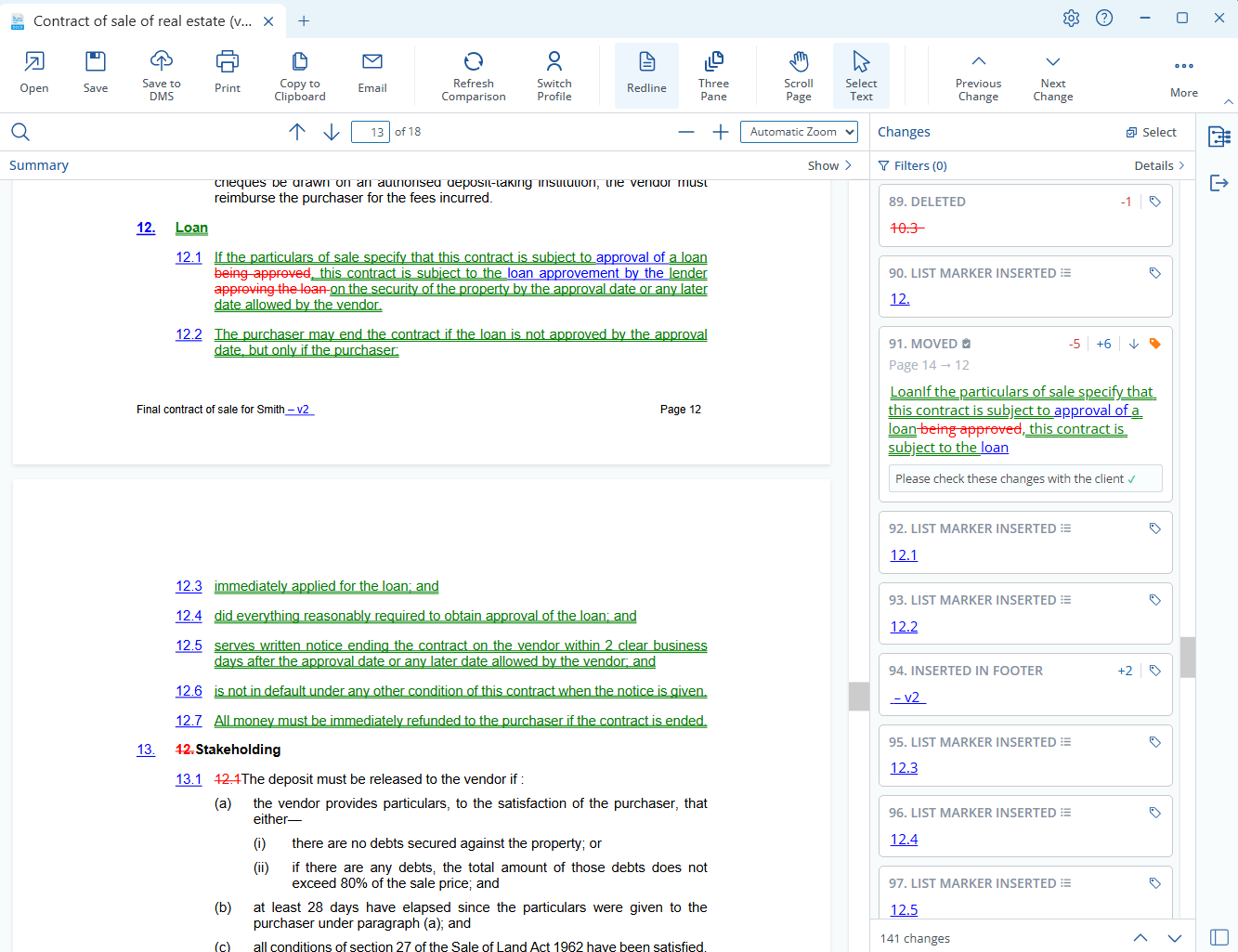
In
the
side
by-side
comparison,
for
instance,
the
original
appears
on
the
left,
the
modified
on
the
right,
and
changes
are
highlighted
in
a
customizable,
color-coded
display.
A
sidebar
on
the
right
highlights
each
change,
with
the
ability
to
tag
or
make
a
note.
Courtesy
of
Draftable.
Lawyers
can
scroll
through
a
long
agreement
or
jump
directly
to
specific
sections
where
edits
appear.
The
report
can
be
saved
as
a
PDF
for
sharing,
or
exported
into
Word
for
further
markup.
Once
documents
are
uploaded,
the
software
creates
several
comparison
types
simultaneously,
so
users
can
select
their
preferred
view.
The
interface
is
deliberately
simple,
which
is
part
of
the
design
philosophy.
Roxburgh
said
users
should
never
have
regrets
about
having
made
the
wrong
decision
in
their
workflow.
“Products
should
be
designed
in
a
way
where
you
don’t
have
to
go
backwards,”
he
said.
“You
maintain
the
flexibility
to
allow
people
to
flow
through
the
product
to
get
the
outcome
they
want.”
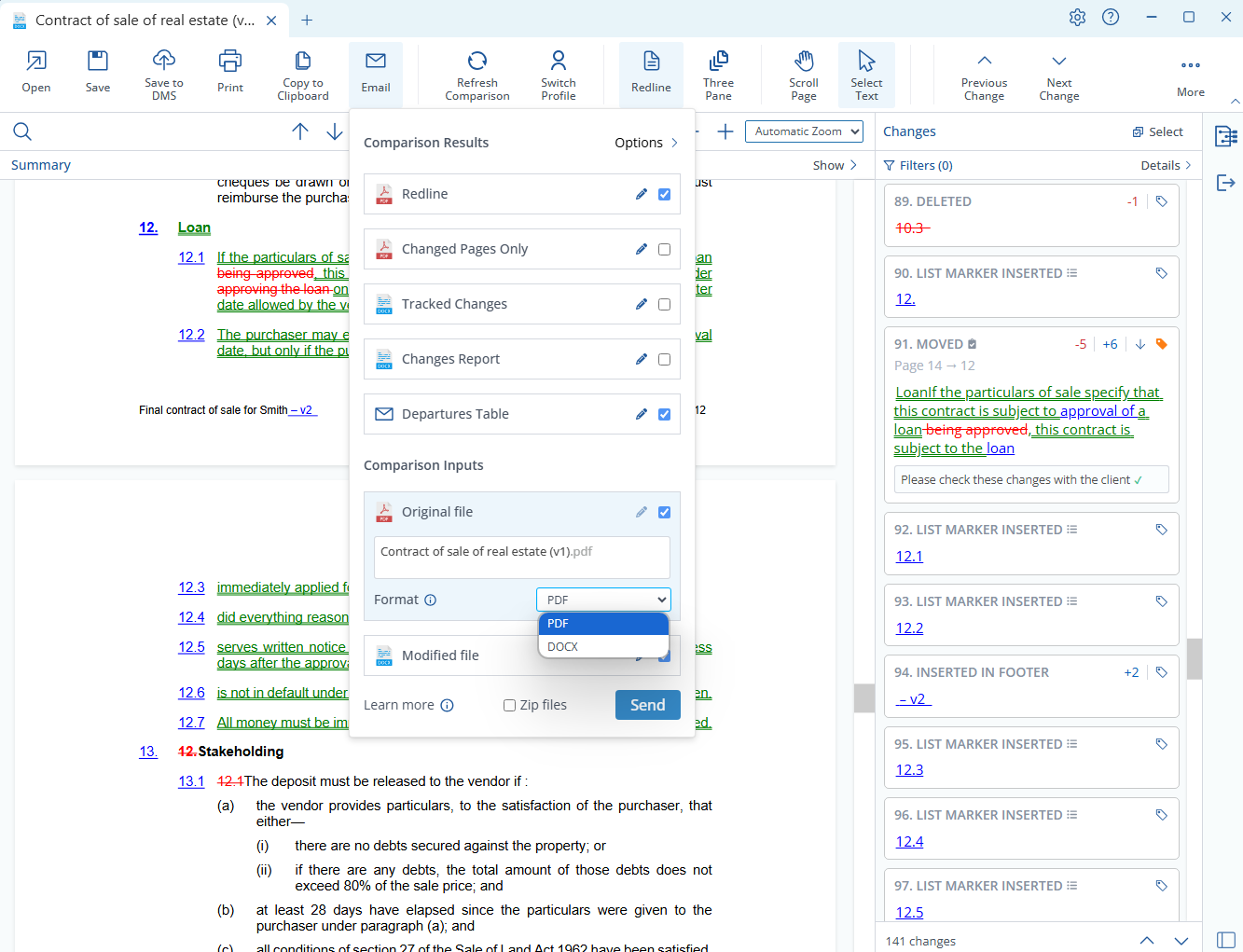
Once
the
changes
are
reviewed,
it
provides
the
option
to
save
or
send
only
what
you
need
to
your
colleagues.
For
instance,
users
could
select
to
export
only
the
redline
and
departures
table
of
the
modified
file
as
an
email.
The
goal
is
to
give
lawyers
immediate
confidence
in
what
has
changed,
without
the
distraction
of
irrelevant
noise.
Courtesy
of
Draftable.
Redline
in
Email
The
newest
feature
most
firms
are
buzzing
about—only
released
in
May
2025—is
Draftable’s
ability
to
handle
redlines
directly
in
email.
Imagine
a
long
email
negotiation
among
a
few
lawyers.
Someone
says,
“Yep,
see
my
changes
below.”
But
they
haven’t
visually
indicated
the
changes.
Instead
of
having
to
compare
each
email
in
a
thread
of
dozens,
Draftable’s
integration
with
Outlook
compares
emails
in
the
thread
to
highlight
the
differences.
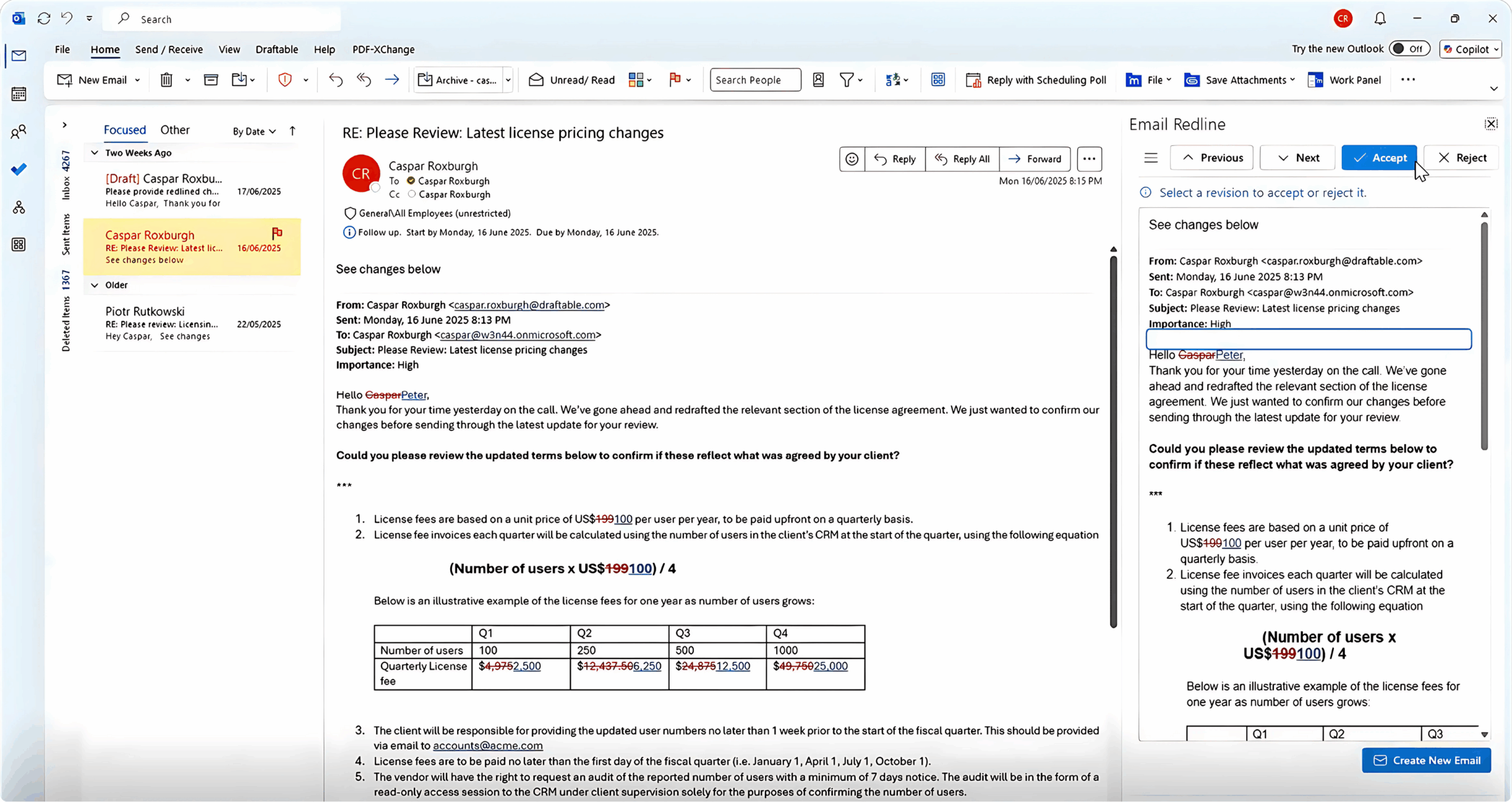
Clicking
the
menu
that
says
“Compare
against
an
earlier
email”
automatically
tries
to
select
the
right
one.
Or
users
can
select
a
specific
email
or
compare
it
against
the
first
email
they
sent.
Courtesy
of
Draftable.
“This
is
hugely
valuable
because
Outlook
can’t
do
this
on
its
own,”
Roxburgh
said.
“We’re
using
Draftable’s
algorithm
with
all
that
ability
to
detect
moves
and
granularity.”
Then
users
can
accept
or
reject
changes
directly
in
the
email.
A
Faster
Departures
Table
Another
of
Draftable’s
standout
features
is
how
it
handles
departures
tables.
Instead
of
asking
lawyers
to
comb
through
a
full
redline,
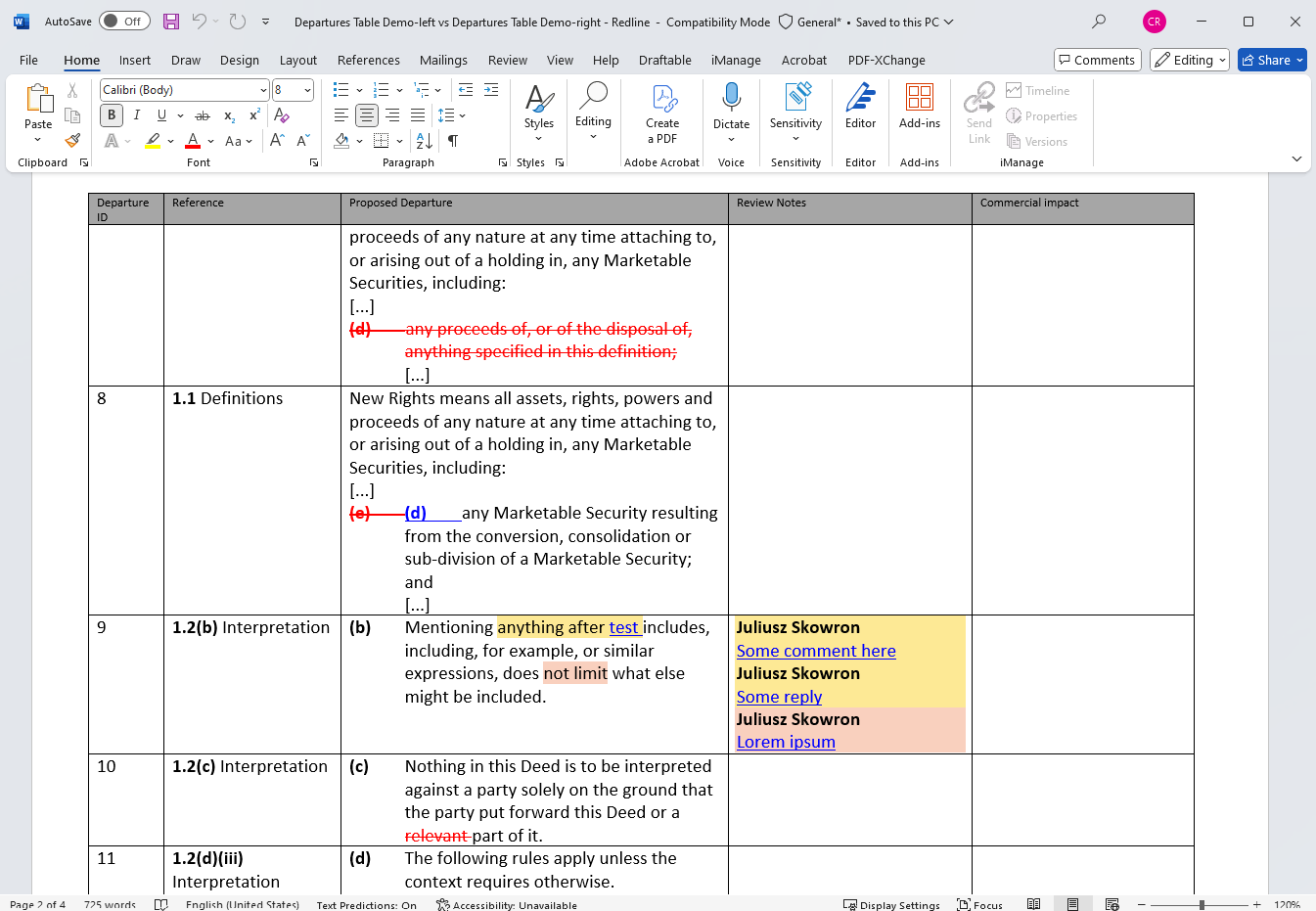
the
software
pulls
out
the
relevant
changes
and
lays
them
out
in
a
structured
table
format.
“Realistically,
most
people
looking
at
what’s
changed
in
an
agreement
aren’t
reading
the
full
agreement,”
he
said.
“They’re
reading
a
summary
someone
else
has
created.”
Traditionally,
that
summary
takes
hours.
An
associate
has
to
review
the
redline,
copy
the
relevant
text
into
Word,
paste
it
into
a
table,
and
add
notes
on
what
the
change
means
and
whether
it
goes
back
to
the
client.
Draftable
automates
the
entire
process
with
a
single
command.
Courtesy
of
Draftable.
Lawyers
can
choose
how
much
detail
to
include—every
change,
or
just
those
marked
as
important—and
the
table
can
be
shared
as
a
Word
or
Excel
document
or
dropped
straight
into
the
body
of
an
email.
That
means
a
senior
partner
doesn’t
have
to
wait
for
a
manual
summary
before
weighing
in.
They
can
see
the
substance
of
the
edits
instantly.
More
to
come
in
2025—for
half
the
money
Roxburgh
said
Draftable
isn’t
stopping
there.
In
the
next
several
months
they
plan
performance
upgrades
that
will
speed
comparisons
and
improve
their
already
stellar
PDF
comparison
tool.
A
modernized
user
experience
will
include
improved
settings,
new
add-ins
for
Microsoft
Office
and
capability
in
German
and
French.
And
perhaps
most
significantly
for
Mac
users,
Draftable
is
working
on
a
web
application
that
can
be
used
on
any
operating
system
and
browser.
That’s
besides
providing
empathetic
customer
support
with
real
humans
at
a
transparent,
fair
price.
“We’re
less
than
half
the
cost
of
our
competitor
and
we
actually
offer
more
functionality,
but
it’s
a
deliberate
choice,”
Roxburgh
said.
“We’re
doing
something
really
boring—building
good
products,
supporting
it
well
and
charging
a
fair
price
for
it.
It’s
not
rocket
science,
but
lawyers
love
it.”